
WooCommerce comes packaged with a basic reporting package capable enough to deliver stats on orders, items, customers and more. With this information right at your fingertips within your WordPress dashboard, why would you want to track your sales performance in separate platform?
While month-over-month revenue reports provide enough detail to determine your rate of growth, they don’t pinpoint the reason behind the growth.
That’s where Google Analytics Enhanced E-commerce reporting steps in…
Google Analytics captures a vast amount of information about each interaction with your website, far more than WooCommerce does. It can overlay various pieces of information on top of your sales data to provide insights that just aren’t possible with WooCommerce reporting.
Let’s see some examples.
1. E-commerce Conversion Rate (Organic vs. Paid Traffic)
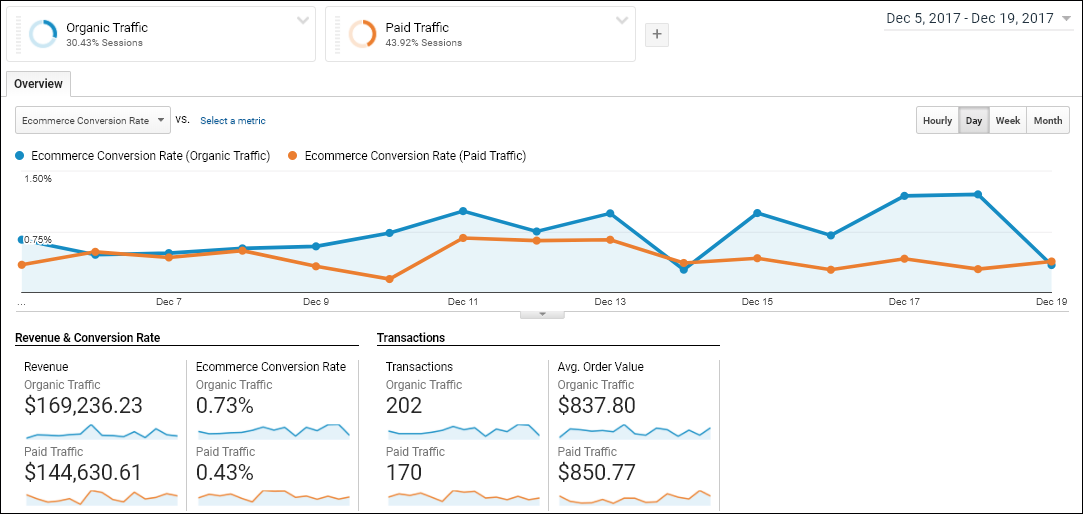
The e-commerce conversion rate is a very important metric for any online store. It tells us the percentage of visits to the site that result in a sale.
The report below comes from Google Analytics and is available to everyone with a free Google Analytics account.
In the example, the paid traffic conversion rate is well below that of organic traffic. That insight alone tells us that we need to step up our paid game or pump more energy into our organic efforts.
2. Multi-Channel Funnels / Assisted Conversions
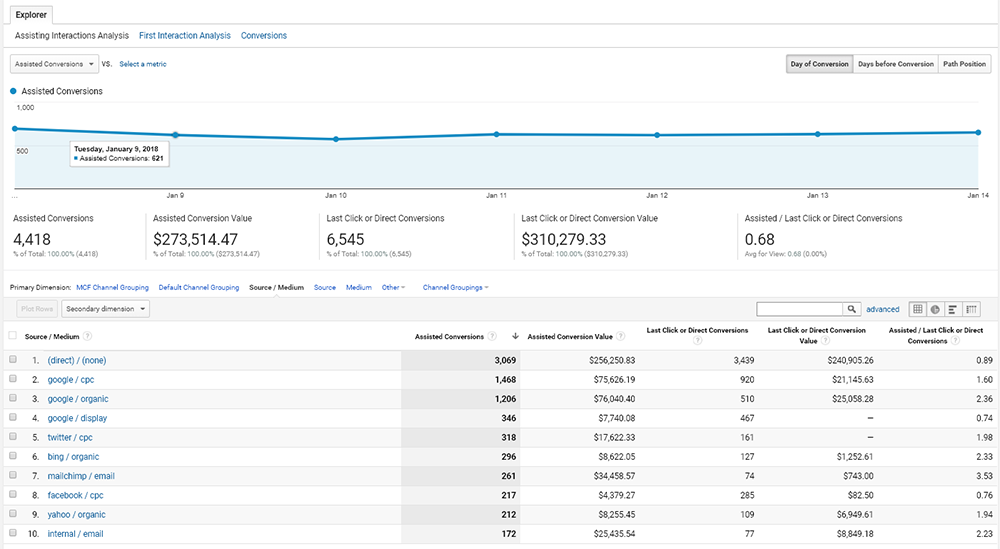
Multi-Channel Funnels sounds way more intimidating than it actually is. It’s basically a way to track all of the “touch points” a visitor used before ultimately completing an order (or other conversion goal) on your site.
For example, a visitor may have completed an order on your website 10 minutes after clicking a Google ad. But, their buying decision was assisted by promotional email as well as a Twitter ad.
The Assisted Conversions report found, inside Google Analytics gives us a breakdown into how much each channel is contributing to overall sales.
3. Data Sharing
Okay, so the 3rd example isn’t really a report. It actually isn’t even an example!
But data sharing is a huge advantage gained when you’re able to track your e-commerce sales with Google Analytics. You certainly can provide a WordPress login to your marketing team, so they can obtain limited sales data from WooCommerce itself. But that would mean providing another person or group access to modify your webstore.
You can share a Google Analytics account with anyone that has a Google account. This would allow someone to gather the marketing insights they need without being able to make inadvertent changes to your webstore.
How do I connect Google Analytics E‑commerce reporting to my WooCommerce Store?
Now that I got you all excited about the insights that Google Analytics can provide you… you’re no doubt wondering how you can integrate your WooCommerce store with Google Analytics.
There are two ways to do this.
- You can ask your web developer to read up on Google’s documentation and implement their own custom integration. This will take anywhere from 3 to 8 hours, depending on your developer’s familiarity with WooCommerce hooks and Google Analytics.
- The second way is quite a bit easier. Just download the free trial of our WooCommerce Google Analytics Enhanced Ecommerce plugin. This plugin was built to be extremely lightweight, with virtually no impact on the performance of your website. Plus, you’ll be up and running in under 5 minutes.